

Reading the queue
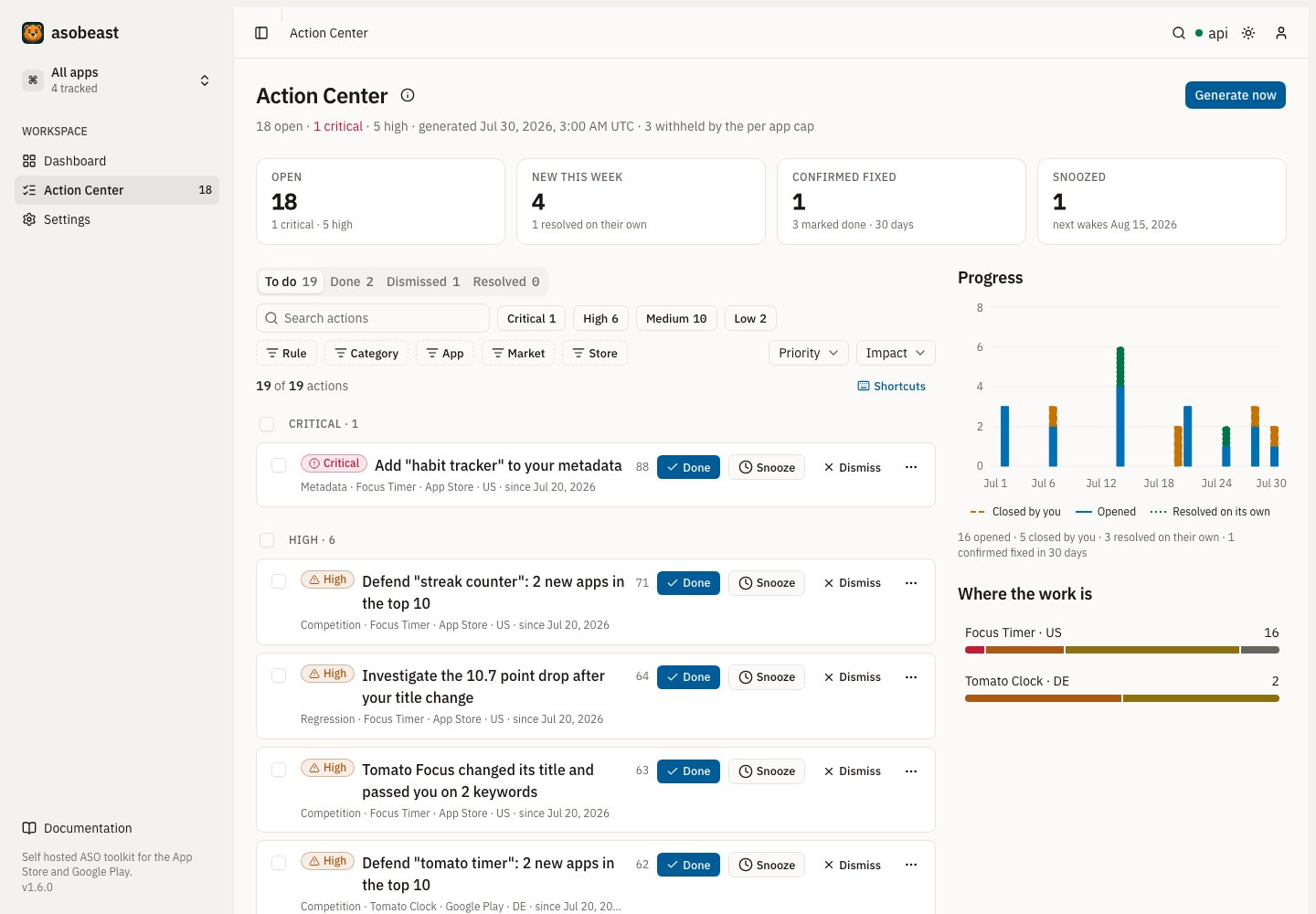
The toolbar filters the queue without a round trip. Status tabs switch between to do (open and snoozed), done, dismissed and resolved. Search matches the headline, the keyword, the app and the market. Priority toggles, the rule, category, app, market and store facets, the grouping (priority, app or category) and the sort all live in the URL, so a filtered view can be bookmarked and shared.
Each row leads with its subject: the keyword, market, competitor or listing field the finding is about, and the numbers that made it fire. Below the headline sit the category, app, store, market and first seen date. A tag marks a snoozed action with its wake date, a done action that is still being verified or was confirmed fixed, a reopened action and a stored action whose evidence could not be read.
On the right, Progress charts 30 days of activity: actions opened, closed by you and resolved on their own. Where the work is splits the open work by app, or by market on an app’s own page, and each bar filters the queue to it.
Opening an action
Selecting a row opens the action in a sheet without leaving the queue. The sheet has these sections:- Why this lists the evidence as graded facts and lists, with one sentence summarizing it.
- How to fix gives the steps for this rule and store, ending with how asobeast confirms the fix.
- Trend charts the rule’s metric from at least 14 days before the action first appeared, with markers where it opened and where you marked it done.
- Outcome appears once you marked the action done. See Outcomes.
- History lists every recorded transition. See History.
- Note keeps a note on the action that everyone in the workspace sees.
- AI summary appears only when AI is configured. See AI explanations are optional.
?action=<id>, so a link to one opens the sheet directly, and closing it returns focus to its row.
The lifecycle
An action is a finding with a life, not a row in a report. A stable fingerprint identifies it across runs, so re running generation refreshes the same action instead of minting a new one.
The difference between
RESOLVED and DONE is the point. Only that distinction tells you whether your fix is what removed the problem.
Confirmed fixed
ADONE action is confirmed fixed the first run its rule stops firing, and the page shows Confirmed fixed from then on. If a confirmed action’s rule fires again, the action reopens at once, because the problem came back after it was gone.
While the rule keeps firing after you marked it done, the action shows Still detected. It reopens once the rule has kept firing for 14 more days, counted from when you closed it, which leaves room for a listing change to reach the store and move the numbers.
How are duplicate actions prevented?
An action is identified by a fingerprint over its rule, app, store, country, keyword and a rule specific discriminator. It deliberately excludes every volatile magnitude: positions, scores, counts and observation dates are all left out. That exclusion is the whole design. If a position were part of the fingerprint, tomorrow’s check would produce a different fingerprint, mint a brand new action, and your snooze and dismiss decisions would evaporate every night. Excluding magnitudes is what makes the lifecycle mean anything. The fingerprint is unique per workspace, so the same finding cannot open twice.Outcomes
Once you mark an action done, asobeast measures what happened to the rule’s metric. The measurement compares the last checked value on or before the day you closed it with the latest checked value.
The verdict is Improved, Worsened or No change, with a small tolerance per metric so noise does not count as movement. It stays Measuring until there are three days of data after you marked the action done. A keyword that was not ranked before counts as one position below the checked depth, so moving from unranked into the results reads as an improvement.
An outcome is a measured value, not proof that your change caused it: a store algorithm update, a competitor’s release or seasonality move the same numbers. asobeast has no download or revenue data, so an outcome never claims either.
History
Every transition is recorded as an event on the action: opened, reopened, snoozed, woke, done, dismissed, resolved and verified. Each event records whether the system or a person caused it, the name of the person, the status, priority and impact at that moment, the snooze date and, for a dismissal, the reason. Sending the same change twice, or at the same moment, records it once. The second request finds the action already in that state and records nothing. Two different changes sent together are both recorded, one after the other. History is kept with its action and pruned with it afterRETENTION_ACTIONS_DAYS. Actions that existed before this history was recorded carry a minimal backfilled history: when they opened and, if they are closed, when and how.
Working faster
Select several rows with their checkboxes, or a whole group with its heading checkbox, and a bar offers Done, Snooze and Dismiss for all of them at once. Every change, one action or many, offers Undo in its confirmation, and asobeast accepts the undo for ten minutes. Dismissing asks for a reason: not relevant to this app, already handled elsewhere, or the data looks wrong. The reason is kept in the history. The queue works from the keyboard. Press? anywhere on the page to see this table.
j, k, / and ? work from anywhere on the page, so j on a freshly loaded page focuses the first action. Esc clears the selection from anywhere in the queue, and the other keys act on the focused action. Shortcuts pause while you type, while a menu or dialog is open and while Ctrl, Alt or Cmd is held.
The rules
Seventeen rules, with fixed constants.
The two conversion rules read the store funnel: they need a connected store console, read complete days of the home market only and open nothing for an app the console does not report. A day is complete three days after it ends on the App Store and seven days after on Google Play, which posts later. On Google Play the home market reads the store listing visitors of every market, because the listing is one listing worldwide and Google files the countries of a small app under Other. Both are advisory, so their impact never passes 50, because the numbers describe what the funnel did, not why. A product page action is one per page and named after the page, so a renamed page opens a new action and the old one resolves.
An entrant counts toward
keyword.defend only when it is plausibly in your niche: a tracked competitor, an app that also appeared in the top 10 of another of your active keywords in the same storefront during the window, or an app whose title shares a word with the keyword. The test is where the app appears, not what kind of app it is. A popular app that a store uses to pad the result pages of two or more of your keywords, such as a social network or a maps app, therefore counts, while one that pads a single keyword and shares no word with it does not. A paused keyword and a keyword in another storefront add no evidence.
The outcome factors measure results rather than a field you edit: the keyword rules are already the lever for rankings, so audit.fix_factor leaves them to the audit page. Unanswered audit checks never count toward audit.fix_factor, and Apple only surfaces are skipped on Google Play rather than recommended impossibly. A factor less than half measured opens no action, and each audit action lists the checks that failed or warned.
reviews.reply_negative runs on Google Play only, because only Google Play replies are recorded. Its link opens the reviews page filtered to the reviews that need a reply, lowest first, where the composer drafts each reply. The rule keeps reading the reply Google Play shows, so a review you mark as replied closes it only once the store shows the reply the next day, while a reply posted from the reviews page counts on the next run. See Reply to reviews. When a more specific rule explains the same finding, the broader one stays quiet without closing: a review theme holds back a rating decline, keyword.defend or a volatile result holds back a push into the top 10, and your own recent change hands a drop to rank.investigate_drop.
Priority and impact
Impact is a stored, versioned estimate on a 0 to 100 scale.
The two advisory rules,
serp.hold_volatile and keyword.prune, are capped at impact 50, so hygiene can never outrank growth.
Impact is stamped with formulaVersion: actions-v1 and is never a promised outcome. asobeast has no download or revenue data, so it never presents one.
Home market rules and market rules
Several rules are worded carefully because of what asobeast can and cannot see.keyword.add_uncovered, keyword.push_to_top10, metadata.fix_lint and listing.ship_update read the home listing. asobeast captures market listings too, but these rules do not yet judge them, so they never claim a keyword is missing from a localized listing.
keyword.prune is the one rule that weighs the relevance of keywords in every market, and a keyword’s relevance follows the listing of its own market. The first capture of a market listing can therefore open or resolve a prune action for that market’s keywords. keyword.add_uncovered, keyword.push_to_top10 and competitor.investigate_overtake weigh relevance for home market keywords only.
market.improve_country says investigate this market rather than fix your localization, for the same reason. It reports a visibility gap, which is a fact, and leaves the diagnosis to you. See Countries and markets.
Limits
Per rule caps also apply where a rule could flood the queue: at most 5 prune actions, 5 pushes into the top 10 and 3 review theme actions per app.
Running it
Generation runs automatically inside the daily pipeline completion barrier, before alerts flush, so a newly opened priority action rides the same batched report.POST /actions/run queues an extra run and returns 202. Generate now on the Action Center calls it, and you can press it again at any time: a request joins a run that is still waiting or running, and starts a new one once the last run finished. It reads stored data only, so it costs no store requests, and the page updates when the run finishes. A run that opens nothing still records when it ran, so the page shows when the queue was last generated. A failing generation is logged and never blocks alert delivery.
AI explanations are optional
WithOPENAI_API_KEY set, an action gains an explain button that turns its typed evidence into two to four plain sentences.
AI may only summarize an action that already exists. It can never create, rank, re order or suppress one, and the entire feature works with the key unset, which is the default. See Enable the optional AI features.
Get notified about new actions
ALERT_ACTIONS_MIN_PRIORITY sets the lowest priority that fires an action.opened event, and defaults to high. Refreshed, touched and resolved actions never fire.
Existing alert subscribers are unaffected until they opt into the event. See Send alerts.
Troubleshooting
- A dismissed action came back. It was a different finding. Check the keyword and country: the fingerprint includes both, so the same rule on a different market is a separate action.
- Fewer actions than you expected.
ACTIONS_MAX_OPEN_PER_APPcaps new actions per run. The run reports how many it withheld. - A rule never fires. Most rules need a minimum number of observed days. A recently added keyword or market has not accumulated them yet.
- An action says still detected. You marked it done and the rule still fires. A listing change takes time to reach the store and move rankings, so give it a few days: the action is confirmed fixed the first run the rule stops firing, and reopens if it keeps firing for 14 days.
- An outcome says measuring. asobeast needs three days of data after you marked the action done, and at least one measurement on each side of that day.
Related
Run an ASO audit
Where
audit.fix_factor gets its evidence.Optimize listing metadata
Where
keyword.add_uncovered, keyword.push_to_top10 and metadata.fix_lint are resolved.